
RG-DesktopLink›Everyday use
Copy and paste
Copy on one PC, move the mouse to another, paste. Text and files follow the cursor, as if all the PCs were one.
Text
- Select the text and press Ctrl+C on one PC.
- Move the mouse over the edge to another PC.
- Press Ctrl+V where you want it.
That is all: copied text follows the cursor to the PC it goes to, so it is ready there.
Files
- Copy them in File Explorer (Ctrl+C) on one PC.
- Move the mouse to another PC.
- Paste them in a folder there (Ctrl+V).
The files start coming over as soon as the cursor reaches the other PC, so they are usually there when you paste. Big files take a moment: the Transfers page shows how far they are. Up to 2 GB at a time this way; for more, drag them or use Send files (see Move and send files).
Only the files that were copied can be fetched by the other PC: it can never ask for any other file of this PC.
The clipboard shelf
Press Ctrl+Alt+V on the main PC's keyboard: a panel opens on the right of the screen with the last 30 things copied on any PC of the office: text and files.
- Each one is a card, newest first; copied pictures show a small picture.
- Paste on a card pastes it where you were typing (it also goes in this PC's clipboard).
- Drag a card anywhere: into a document, an e-mail, a folder. Tick several, then drag one of them to take them all.
- Clear all forgets everything copied so far (the files themselves stay where they are).
- Esc closes it.
Handy when you copied three things in a row on one PC and need them one by one on another.
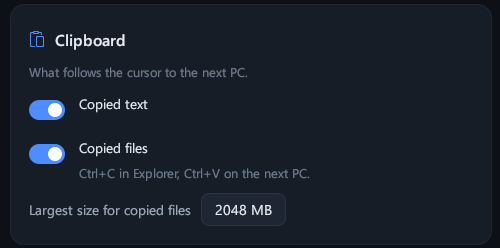
Settings: the clipboard
- Copied text: on, text follows the cursor.
- Copied files: on, Ctrl+C in Explorer and Ctrl+V on the next PC.
- Largest size for copied files: 2048 MB by default.
Turn one off on a PC whose copies should stay on that PC.
How fast
Text is there at once. Files go over the office network, encrypted; text files, code and logs are compressed on the way, so they go faster than their size suggests. On a Wi-Fi link everything is slower than on a cable.
If paste does nothing
- Files: wait a few seconds and look at Transfers; for very big files use Send files.
- Check that the clipboard switches above are on, on both PCs.
- More in Troubleshooting.